SanDisk Sansa Fuze+

SanDisk Sansa Fuze+

Apple has enjoyed an undeniable stranglehold over the $100+ portable media player market for years now�it's pretty much been iPods and also-rans. The budget realm, however, has never been Apple's strong suit, and SanDisk and other manufacturers make players that outperform the iPod nano and iPod shuffle. The Sansa Fuze+, an update to 2008's Sansa Fuze ($130, ), comes in 4GB ($79), 8GB ($89), and 16GB ($119) flavors. One of the Fuze+'s key features: video playback. Apple eliminated video from its latest iPod nano, and it's not so much that SanDisk has made an amazing product here, it's that Apple has eliminated one. And the Fuze+, for relatively little cash, can step in and fill that void. Why buy an iPod shuffle ($49; 2GB, ) or a nano ($149; 8GB, ) when the Fuze+ can do so much more?

Design


Measuring 3.1 by 1.9 by 0.3-inches (HWD), no one is going to mistake the shiny, black plastic Fuze+ for an iPod nano, new or old. The device feels a bit bulky, and is more the size of a cell phone than what you might expect of a portable media player with modest functionality. A 2.4-inch, 320-by-240-pixel screen occupies the upper portion of the front panel; below it you'll find the touch-sensitive control pad consisting of a backward arrow, a Play/Pause button, and a four-way, cross-shaped controller, all painted on to the surface in silver to guide your fingers to the right spot. The Power button resides on the upper panel, Volume controls and a microSDHC slot on the left, a mini USB jack on the right, and the 3.5mm headphone jack is on the bottom panel. Some slightly-better-than-average earbuds�they offer some low-end response and fit securely, at least�and a USB computer sync cable are included with the player.

Performance


Generally, the touch pad below the Fuze+'s screen works well enough, but occasionally the pad doesn't respond and the swipe gestures make one yearn for a nanoesque multi-touch screen instead. The player's animated user interface behaves as if swipes on the control pad are actually occurring on the screen, and I often found myself tapping the screen, out of habit, to call up album artwork or make a song play. At this price point, though, it's hard to expect much more. Apple thinks you want a touch screen so badly you'll sacrifice video playback and pay more than you would for the Fuze+. My guess is most people would gladly ditch a tiny, limited multi-touch screen in favor of a display that plays video, and that's what the Fuze+ offers. The fact that SanDisk clearly spent some time making the user interface look handsome only helps the player's cause.

My greatest annoyance with the user interface is simple menu navigation. You swipe left to right to move to the next option, but for some reason, SanDisk thought you would like to reach the end of the menu and then swipe backwards several times in order to reach to the top again, instead of, say, swiping once and making the navigation of the menus never-ending, like a carousel. It's a mistake sure to get more annoying with repeated use, and one Apple would never make. From left to right, the menu options (each of which occupies the entire screen when you view it) are Music, Video, Photo, Radio, Podcast, Voice, Card (for accessing content on an external microSDHC card), and Settings.

SanDisk keeps things simple and, aside from the navigation annoyance, the results are quite user friendly. The music playback screen shows off album artwork in color and at a size that rivals the entire outer contour of the new square-shaped iPod nano. SanDisk also includes, amongst a bevy of presets, a custom EQ setting that you can tweak to your preference�something Apple has never included.

The Sansa Fuze+ supports MP3, WMA, Protected WMA, Ogg Vorbis, FLAC, unprotected AAC, and Audible files for audio. For video, it natively plays H.264 and WMV files, and JPEG and BMP photo files are also supported. With the aid of Sansa media Converter software�available as a free download�other video and photo file types can be converted to play on the Fuze+.

Perhaps the nano lacks video because Apple didn't think it looked compelling on a small screen. The Fuze+ has a modest screen with modest resolution and the video-watching experience doesn't come close to what you get on, say, the iPod touch ($299; 32GB, ). But not everyone is looking for high-fidelity audio and HD video perfection on their morning commute or a business flight. Some people just want to be able to watch a TV show or movie on a small, inexpensive device they can throw in a bag without worrying about shattering its glass screen. SanDisk made the Fuze+ for this crowd (the same crowd the nano used to target), and both the video and photo experience the player offers will make less demanding customers happy. The default size for viewing photos is larger than the nano's entire screen. Are things a bit jagged and pixelated? Sure, but again�you can buy the 8GB Fuze+ for $90. That's well below the entry level nano price, which has no video and only limited photo support. The cheapest iPod that plays video is now the $229 8GB iPod touch, so suddenly $90 for lower-resolution but watchable video seems like a good deal, doesn't it?

The FM radio is easy to operate and includes recording, auto-scanning, and 40 programmable presets. The Voice recorder could sound better�there is some lag between what you say and what you hear, and the act of pausing or stopping a recording involves tapping the screen, which the microphone picks up. Recordings are stored on the second page of the Voice section. Regardless, it's a handy feature to have.

SanDisk rates the Fuze+ battery life at 24 hours for audio playback. Our own rundown test results will be posted here soon.

Clearly, the Sansa Fuze+ is not a masterpiece, or even close to one. It's not a sexy-looking device, and its video and photo capabilities are useful, but the screen isn't going to knock your socks off. Keeping all of this in mind, the pricing seems quite reasonable�two of the three models ring up for less than $100. Head-to-head with the iPod nano, the Fuze+ has a larger screen, can play video and display photos with better accuracy, and provides identical storage capacities at far lower cost.

For $10 more, our Editors' Choice for budget players, the Archos 3cam vision ($99; 8GB, ) offers a camera with video-capture capabilities. Also, the same-price Samsung YP-R0 ($99.99; 8GB, ) is generally a solid player and ships with far-better-than-average earphones. None of these devices is headed to the consumer electronics hall of fame, but simply put, the latest iPod nano isn't worth the money, and the Fuze+, Archos and Samsung players are.

Sony Walkman E Series (NWZ-E353)

Sony Walkman E Series (NWZ-E353)
At $69.99 (direct), the new Sony E Series Walkman (NWZ-E353) MP3 player is very reasonably priced. Not only do you get 4GB of storage, a 2-inch screen, and photo and video support, but for far less than the new Apple iPod nano ($149; 8GB, 2.5 stars), which has a smaller 1.54-inch screen and offers no video support at all. Sony could have stopped there and had a modest-but-cheap product on its hands, and that's what the company did. The Archos 3cam vision ($99; 8GB, 3.5 stars) has a video recorder and Samsung's YP-R0 ($99.99; 8GB, 3.5 stars) has a better user interface and earphones than your average budget player, but the E Series is no-frills device. It's works well, but is a bit boring when compared with other low-price players.

Design and Features
Sony's E Series NWZ-E353 comes in blue, black, or red; our test unit was a deep, polished red with a matte black plastic rear panel. Unlike most of the new MP3 players which have moved on to touch screens or touch-sensitive surfaces, the 4GB NWZ-E353, which measures 3.7 by 1.75 by 0.4 (HWD), features physical buttons. Its 2-inch, 320-by-240-pixel display occupies the top half of the front panel; below it are an an array of controls. The middle control is in the shape of a wheel with a Play/Pause button at its center. There's no scrolling or moving this wheel, however, which feels strange if you are familiar with older iPod models that sport similar-looking controls. Instead, the wheel is clickable in four points. Two circular buttons flank the wheel control: a Home/Back button and an Option/Power button�how long you hold each determines which action it triggers. A Hold switch and Volume controls are located on the right-side panel and a 3.5mm headphone jack, a mini USB connector, and a lanyard loop are located on the bottom panel.

Performance
The player's user interface is simple to navigate, but it looks like it was designed a few years ago, and the fact that the aforementioned wheel-shaped controller does not in fact scroll also makes the device feel dated. There are nine icons on the main menu: SensMe channels, FM Radio, Playlists, Photos, Music, Videos, Settings, Podcasts, and a shortcut to the music playback screen. SensMe is similar to Apple's Genius Playlists�Sony organizes your music by genre or mood. The FM radio, which is armed with 30 programmable memory stations, is fairly easy to operate, just don't go looking for FM or voice recorders, like you'll find on the SanDisk Sansa Fuze+ ($89; 8GB, 3.5 stars), you won't find them here.

There's a user-programmable EQ that also comes with four presets. Sony excels at bringing out the bass if you want it, so if you're a low-end lover, you'll be able to increase the bass substantially. Of course, with the included earbuds, not much low-end can be heard, and I suggest upgrading to a better pair. If you're up for it, our Headphone Buying Guide is a good place to start your search. Options like Clear Stereo and DSEE (Sound Enhance) are gimmicks you'll find in the Settings menu that I recommend leaving off. There's a Speed Control option if you want to listen to podcasts or books on tape on your commute.

Video playback is not one of the players' strengths. Jagged edges abound, and even if you're not a videophile, you'll notice a modest drop-off in quality compared with much of the competition. Still, it's not unwatchable, and as noted before, other players like the Archos 3cam vision cost more. Photos look about as underwhelming; it's not unlike looking at images on a lower-tier cell phone screen, but again, there's no room at this price for a high quality display.

As far as file support, for audio, the NWZ-E353 can handle MP3, WMA (including DRM-protected WMA), AAC, and Linear PCM files. The player only supports WMV files for video playback and JPG for photos. This is slim pickings, but since the player is so inexpensive, it's a minor criticism.

Sony rates the battery life for the Walkman E Series NWZ-E353 at approximately 50 hours for audio playback and 10 hours for video playback�both of which are impressive numbers. We will publish our own battery test results here shortly.

By eliminating video capture and playback from the iPod nano, Apple has made way for low-cost MP3 players to compete with the nano and the iPod shuffle ($49; 2GB, 3.5 stars), which doesn't even have a screen. Sony may offer what these players lack, but it doesn't mean the Walkman E Series (NWZ-E353) is a compelling product. In fact, the Archos 3cam vision and the SanDisk Sansa Fuze+ are not terribly exciting either, but if you are going to go with a budget MP3 player, I'd choose the one with the most features. With a camera for stills and video, the Archos 3cam vision handily wins the feature war, even if the camera is low quality. It's priced at $100, sitting somewhere in between the nano and the Walkman E Series. If none of these options sound like must-haves to you, you're not alone. My advice is to save up for an iPod touch, or invest in a cell phone with music playback features.

By Tim Gideon

GPU Observer Gadget

The GPU Observer Gadget, released by Orbmu2k, is an all-in-one desktop gadget for both Nvidia and ATI graphics cards. Select your card from a list, unless it�s already been selected for you, as well as some display options and you�re ready to go.
GPU Observer Gadget

GPU Observer Gadget

It can show temperatures, fan speeds, loads, memory usage and clock speed to help you keep an eye out for overheating or faulty graphic cards. You can even run several instances of the gadget if you have got more than one graphic card.

This is my personal favorite of all the windows 7 gadgets I�ve tested, so try it out yourself!

The back-end of this win7 gadget uses technology like nTune, NVAPI and ATIADL to determine GPU information.

Configure Screen

Configure Screen

Dowload Here

HUD Time � Windows 7 Gadget

HUD Time adalah sebuah Gadget pada Windows 7 yang dapat digunakan untuk menampilkan waktu, tanggal dan hari pada tampilan desktop windows. Yang menarik dan gadget ini, waktu yang ditampilkan memiliki efek transparan dan ukuran yang jelas terlihat

Pengguna dapat mengubah jenis font sesuai yang diinginkan. Ada banyak pilihan jenis font yang telah tersedia pada settingan HUD Time. Kekurangan dari widget ini untuk ukurannya tidak dapat dirubah. Tapi ukuran dari widget ini rasanya sudah sangat pas dan dapat dipindahkan kemana saja di layar Desktop

Download : HUD Time Gadget

Apple iTablet dan Microsoft Courier

Informasi teknologi terbaru Gadget 2010. Saat ini, ada beberapa kabar tentang dua produk baru gadget 2010 �tablet� yaitu proyek: Apple iTablet dan Microsoft Courier.

Adapun Microsoft Courier, tampaknya, PC Tablet ini dalam tahap perkembangan terakhir dan fitur-fiturnya akan membuatnya terlihat lebih mirip Booklet daripada Tablet PC. Meskipun pengenalan resmi perangkat ini belum dilakukan, Microsoft telah mempelajari tayangan dari beberapa pengguna yang telah menggunakan Tablet PC, yang merupakan istilah yang merujuk pada komputer yang dilengkapi dengan layar sentuh (atau grafis tablet / screen hybrid) dan pengaturan kompleks, aplikasi dan mode.

Pada saat itu diketahui bahwa (berkenaan dengan fitur dari produk Microsoft yang baru) akan memiliki dual layar 7-inci dengan dukungan multitouch dimana pengguna akan dapat membalikkan halaman, menulis, dan menggambar dengan menggunakan jari-jari atau sebuah pena stylus. Layar juga akan menunjukkan tingkat daya baterai dan status koneksi internet di daerah samping. Selain itu, Microsoft Courier akan datang dengan foto kamera di bagian belakang perangkat, namun tidak diketahui berapa banyak piksel akan ditampilkan.

Adapun Apple iTablet, satu-satunya hal yang dikenal pada saat ini adalah Asus akan berkolaborasi dengan perusahaan Steve Job�s untuk membuat gadget ini. Dan juga desas-desus bahwa Apple akan difokuskan pada penciptaan perangkat ini dalam rangka untuk menutup kesenjangan antara biaya produksi sebuah iPod (harga eceran sekitar US $ 200) dan biaya produksi sebuah MacBook (harga eceran = US $ 999) . Karena itu, diyakini bahwa harga eceran Apple iTablet akan mendekati US $ 700.

Desain Apple iTablet masih merupakan misteri, meskipun beberapa analis memperkirakan yang akan tampak seperti sebuah iPod Touch dengan dimensi lebih besar. Di sisi lain, non-gambar resmi diterbitkan di web tapi sangat mungkin bahwa itu adalah gambar palsu, dilihat oleh desain miskin. Selain itu, beberapa hari yang lalu, sebuah video yang seharusnya untuk menunjukkan sebuah tablet-dioptimalkan Wired edisi dalam iTablet Apple juga diterbitkan � tidak ada komentar resmi dari Apple.

Itulah sedikit informasi tentang gadget 2010 dan anda bisa mulai mempersiapkan sedikit dana untuk memilikinya


repost : http://antilogin.blogspot.com/2009/11/gadget-2010.html

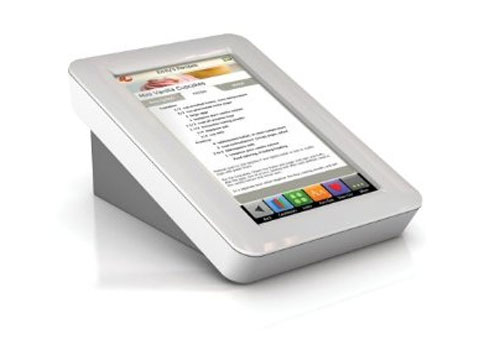
Demy Digital Recipe Gadget for the Kitchen

demy-sb1

By Shane McGlaun

I am a big fan of gadgets of any type really. It doesn�t even have to be a gadget I really have a need for it to stoke my geek lust. In my house I cook quite frequently, typically the stuff my kids like, which means lots of Hamburger Helper. I don�t mind cooking from the occasional recipe though like my grandma used to do.

Grandma had this huge box filled with old, browning index cards she had been using since the days when computers were science fiction. Today if I want a recipe, collection I don�t have to resort to something as old fashioned as actually writing a recipe, I can grab something like the new Demy Digital Recipe reader.

The Demy device is kitchen-safe according to the maker, Key Ingredient, which I assume to mean it can take splashes of olive oil and the occasional sprinkling of salt. Demy has a 7-inch touchscreen and can store tons of recipes in its digital memory from the Key Ingredient website and recipes you copy and paste form other websites or type in manually. The device will ship in May for $299.

VIA [ Amazon ]

DigitalTech TouchStone Digital Hand Warmer and Portable Gadget Charger


One thing we love here at TFTS is gadgets that fuse seemingly unrelated functions together in a single device � resulting in something truly unique � and this digital hand warmer and portable gadget charger, known as the Touch Stone, from DigitalTech certainly falls neatly into this category.

Looking itself like an MP3 device (we are reminded of Creative�s Zen Stone MP3 player) this device will not only serve to charge your portable gadgets, such as cell phones, PDAs, digital cameras and MP3 players via a 24-pin connector, should they run out of juice but it will also act to keep your hands warm whilst out in a blizzard thanks to a user defined warmth setting.

Powered by a rechargeable lithium-polymer battery, the pocket sized DigitalTech TouchStone, apart from keeping your digits snug, will provide enough additional juice to power cell phones for up to nine hours whist, as a hand warmer, the unit offers around six hours of continuous heat.


Available in red or black, and measuring a mere 98 x 64 x 16 mm, the DigitalTech TouchStone Digital Hand Warmer and Portable Gadget Charger retails for 39,600 South Korean Won (approximately $44 / �21 / �30.

Read: DigitalTech TouchStone Digital Hand Warmer and Portable Gadget Charger � TFTS � Technology, Gadgets & Curiosities

Sourc: http://nexus404.com/Blog/2007/11/02/digitaltech-touchstone-digital-hand-warmer-and-portable-gadget-charger/

Cook With the Pros And Play Ball As One: iPhone Apps Of The Week

iPhone (Credit: CNET)

The big Apple iPhone news this week involved a new app approved in the iTunes App Store called Skyfire Web Browser (link will open iTunes). This new Web browser's claim to fame is that it can display Flash content by using an interesting workaround. The browser sends Flash content to its own server, converts it to HTML5, then streams the content back to your iPhone. Jessica Dolcourt wrote about Skyfire's shaky launch here.

Apparently, within 5 hours, Skyfire's servers were overloaded (imagine that!) as people swarmed to a new way to view Flash on the iPhone. To be honest, I haven't run into many problems with not having Flash, but I definitely hope that Apple and Adobe or someone can come to an agreement so any smartphone user can get ALL the Web content available.

As of right now, Skyfire is still available at the iTunes App Store, but I have to wonder how it could not know there would be an onslaught of traffic and prepare accordingly. It also makes me wonder if it's really worth the trouble.

What do you think? Are you content waiting for developers to convert everything to HTML5 (if that's even possible)? Should Apple just throw caution to the wind and make it so Flash works (and open the platform to those alleged dangers)? Let me know in the comments!

This week, get cooking with chefs from the Food Network and play a fun arcade baseball game.

In The Kitchen

Once you find a recipe, use the top buttons to see a list of ingredients and how to cook the dish.

(Credit: Screenshot by Jason Parker/CNET)

In The Kitchen ($1.99) gives you a recipe database made up of delicious recipes from all your favorite chefs from the Food Network. The interface offers a number of ways to find a good recipe, either by using a search tool or by touching the image of a chef from the Food Network.

Browse through thousands of recipes from popular chefs including Bobby Flay, Alton Brown, Paula Deen, Giada De Laurentiis, and Rachael Ray, and get reviews for recipes from other users. Once you decide on a dish to make, you can have In The Kitchen create a shopping list for you so you can check off ingredients as you walk around the store. The shopping list is particularly helpful because you can add just the items you need or all the items from multiple dishes. Even if you don't want to make a particular recipe today, you can store favorites in a Recipe Box so you can get back to them later.

Along with tons of recipes from your favorite Food Network chefs, handy tools for shopping, and a Recipe Box for your favorites, In The Kitchen offers timers so you don't even need to set a separate one. With all these features and the addition of special seasonal recipe collections, anyone who wants to add to his or her cooking repertoire should definitely download this app.

Baseball Superstars 2011

You'll need to use your all stars (pitchers mound) to get out of difficult game time situations.

(Credit: Screenshot by Jason Parker/CNET)

Baseball Superstars 2011 ($4.99) lets you play a cartoony, but surprisingly deep version of America's favorite pastime on your iPhone. You can choose from 10 teams initially with varying skills (some have better batting, whereas others might offer faster runners, for example) and play a standard baseball game. The graphics are more cartoonlike than realistic, and you won't be able to choose your favorite team (Baseball Superstars is not licensed by MLB), but you'll quickly forget your team is "The Dolphins" once you start playing in an exhibition game, home run hitting derby, or even a 45-game season.

Baseball Superstars 2011 offers plenty of depth and replay value by allowing you to customize a batter or a pitcher with items you can buy in-game. You also have special pitches and a super-hitting button with special players you can unlock as you play. Though you don't have full control like you would in a console baseball game, Baseball Superstars 2011 manages to use the iPhone touch screen very well. Fielding the ball is done automatically, but you have full control over the type of pitches you throw and ball placement.

Even though Baseball Superstars 2011 is not a realistic-looking baseball game, and doesn't come with our favorite players and teams from the pros, this title will still appeal to baseball fans offering some RPG elements and plenty of extras to keep the game interesting. My only question is, why did they release this game after the World Series was over (go Giants!)?

What's your favorite iPhone app? Are you excited that you finally have the recipes from Food Network favorites on your iPhone? What do you think of the arcadelike but surprisingly deep gameplay in Baseball Superstars 2011? Let me know in the comments!

Sourc: http://download.cnet.com/8301-2007_4-20021985-12.html?tag=mncol;txt

Top 10 free iPhone apps

With the iPod (probably the iPod Touch) and the iPhone swiftly becoming a must required gizmo for almost everyone across the globe, various apps for both these devices are readily coming up over the internet and also on iTunes. The iPhone apps range from simply annoying to useful ones as they have actually revolutionized these devices.

Here is the list of 10 free iPhone apps that have topped the list of best free iPhone apps:

  • Facebook-Frankly, you cannot name someone who is not actually using this social networking service. Free facebook app will allow the user to upload pictures, chat and check the status messages of their friends.

  • Stanza-This is the best app for those people across the globe who love book. Stanza proves to be a great competitor on the iPhone as compared to its competitor, Kindle, launched by Amazon.

  • PhoneSaber-This is a free of cost app that can actually be of zero practicality and almost no use but who doesn�t require to be a Jedi? With this app you can go mad by swinging your iPhone all around your head and look the lightsaber on your iPhone moving to and forth along with you.

  • Light-O-Matic-This is absolutely true that you have had the situation when you try to apply the dim light of your phone to search or find something when it is dark. This app, Light, is a genius yet simple free app that will turn your own iPhone into a sort of flash light.

  • Twitterific-This is a fact that almost everyone uses twitter these days and why not as it is the best place to put up views and thoughts to share with all your pals. This free app makes life easy for you to chase your followers�.

  • Shazam-The word truly appears like the one used for a magician. This can help you know the title or the artist sing a particular song that you just heard on the radio.

  • Tap Tap Revenge-Rock Band and Guitar Hero fans can now rejoice. This free app designed by Tapulous is crazily sort of addictive and you will tap your feet and fingers on your iPhone while you listen to it.

  • Google Earth-Keeping it easily, now you walk with the entire world in your pocket. This is a powerful and free app that allows you to look at amazing imagery by the satellite just on the palm of your hand. This applet is very useful for those who have interest in geography and satellites.

  • Pandora-Pandora is actually a personalized radio available free of cost. The sound of it just sounds perfectly incredible. You can now tune into your favorite radio station over the internet or even make out the radio stations through their genres. You can now tune into those stations almost anywhere.

  • EBay Mobile-Now electronic agents for auctioning can leave their houses in peace. You can now track your auctions on eBay, activity and sales all using your iPhone and this free app. Using your iPhone You can place your own bid!

Sourc : http://www.comptalks.com/top-10-free-iphone-apps/

Magellan 2010 Lineup of GPS Navigation Systems

Magellan 2010 lineup of GPS navigation systems
As you may already know Magellan just introduced a bunch of new GPS navigation systems for their RoadMate series. The new models range from 4.3? screen to 5? but all of them come with integrated Free Lifetime Live Traffic. Also all models are capable of text to speech, multi destination routing, and know about 6 million points of interests. The prices will range from $170 to $300.

Without further ado here are all of the seven new models:

4.3? screen

  • RoadMate 2035: 48 states and Puerto Rico
  • RoadMate 2036: add Canada, built-in AAA Tourbook, Roadside assistance, lane assistance
  • RoadMate 2045: add microSD card slot

4.7? screen

  • RoadMate 3045: maps of U.S., Puerto Rico, Canada
  • RoadMate 3045LM: add lifetime maps
  • RoadMate 3055: 3045 + bluetooth, voice dialing
  • RoadMate 3065 Commuter: adds the exclusive Traffic Wake-up and Periodic Reporting.

5? screen

  • RoadMate 5045: 3045 with a 5? screen

You can read about the flagship model Magellan Roadmate 3065 Commuter here.

Magellan Announces 2010 RoadMate GPS Device Lineup

Magellan announces 2010 RoadMate GPS Device Lineup

Magellan introduces its new 2010 RoadMate line of GPS navigation devices. These new GPS devices also come with integrated Free Lifetime Live Traffic and the exclusive OneTouch personalization feature allowing you to save favorite places, categories and searches.

In total there are 10 models and all of them feature spoken street names, 6 million points of interest, QuickSpell for error-free address entry and multi-destination routing as well as the Automatic Parking Lot Finder parking feature.

Models:

RoadMate 2000-series

  • RoadMate 2035 � 4.3-inch Display, Maps of United States and Puerto Rico � $169.99
  • RoadMate 2036 � All features of 2035, adds maps of Canada, built-in AAA Tourbook and Roadside Assistance and Highway Lane Assist � $179.99
  • RoadMate 2036-MU � All features of 2036, adds one free map update � $199.99
  • RoadMate 2045 � All features of 2045, adds microSD card slot � $199.99

RoadMate 3000-series

  • RoadMate 3045 � 4.7-inch screen, Maps of United States, Canada and Puerto Rico � $199.99
  • RoadMate 3045-LM � All features of 3045, adds Free Lifetime Maps � $229.99
  • RoadMate 3045-MU � All features of 3045, adds one free map update
  • RoadMate 3055 � All features of 3045, adds Bluetooth and voice dialing � $249.99
  • RoadMate 3065 Commuter � All features of 3055, adds Traffic Wake-up and Periodic Reporting � $299.99

RoadMate 5000-series

  • RoadMate 5045 � All features of 3045 with 5-inch screen, maps of United States, Canada and Puerto Rico - $219.99
[magellan]

New GPS X Guider

New GPS X Guider
Sometime ago we mentioned a new GPS for back tracking � called GPS X-Guider. We decided to get this GPS back tracker for a thorough review and want to share our findings here.

The term GPS backtracker is quite new � usually referring to small handheld GPS devices dedicated to routing you back to a waypoint you�ve marked. This could simply be the spot you parked your car, your favorite camping site, or even the spot where your buried the body in the middle of desert. This is nothing an advanced GPS device can�t do but it�s nice to have a small easy to use GPS handheld for the job. You could even claim your smartphone can get the job done � but good luck with that battery life. Since acquiring GPS signal usually eats up a lot of power your Android/iPhone may be out of out juice within the first hour of your adventure. You might as well keep the last 5 minutes of your battery life to record a voice message for your loved ones.

But anyhow � back to GPS X-Guider. First thing you�ll notice with this GPS device is its simplicity. Simple menus, only two buttons, but still a lot of features.

Hardware

We�re not sure what kind of GPS receiver chip is in this GPS back tracker but we�re happy with it. Out of the box (cold start) it took less than a minute to get a satellite fix and after that it was literally seconds for GPS X-Guider to figure out where it is.

GPS X-Guider is super light. Without the two AAA batteries it pretty much weighs nothing � really good if you�re anal about how much weight you�re taking with you. The batteries actually add some needed weight � so it feels good to hold. Speaking of battery life; all we can say is that it is really decent. After 3 days of on and off review it still has one bar left but we�re never patient enough to actually run it out completely and give you a specific number. The manual claims 16 hours of straight use. And you can always carry spare batteries with you.

The screen is not very exciting but it gets the job done without wasting power. It is definitely sunlight readable and when it is dark out the neo blue backlight comes in handy and makes it a pleasure to use GPS X-Guider.

GPS X-Guider comes with a really durable silicon case that fits tightly and makes it IPX6 water resistant. Pressing the buttons with the case is still very easy; so no worries there. There�s also neck strap / lanyard in the case so it is ready to attach to your backpack or put around your neck.

Software

Software of GPS X-Guider is very comprehensive. It lets you organize your theme destinations, back tracing way points, route plans, and the tracks you�ve logged. One side of the window is the options we listed and the other pane is live Google Maps. You can drag, zoom, switch between map, satellite, hybrid views just like you�d in your browser. If you don�t like the software for some reason you can always export your tracks to other formats which include KML, GPX, and NMEA.

Say you�re planning a trip: the software even allows you to name each point on your route so you know which waypoint you�re headed to. To be more specific you can call your waypoints as such: �1)car park, 2)trail head, 3)good place for pics, 4)cross over creek here, etc etc�.

Firmware

When we say firmware we�re talking about the menus and options that are actually on the device itself. There�s isn�t much to say here. Once you get used to it is pretty easy to navigate around.

One screen shows the time that gets set automatically using your position and satellite time. Another screen shows compass; arrow pointing north, and the smaller arrow around the edge pointing to your destination. Another screen is the speedometer; which also includes the direction of your destination. In the actual guider you�ll get a giant arrow pointing to where you need to head, and the name of your next waypoint. And then there�s the trip info screen which shows details such as speed, odometer, distance, altitude, etc. Like we said; small device packed with features.

Long story short we found GPS X-Guider to be a very handy and inexpensive hanheld GPS back tracker. We do recommend it. You can grab one at GPS X-Guider for $109. Good deal.


2011 Day © 2011